
Your own page behind the QR code
One scan at the counter opens your shop's page: your memberships, a link to a Google review, your socials, your website and your address. In your colours, and you change it yourself whenever you like.
Reviews, socials, rewards. One seamless spot.
Your customers see it all. In one place.
 DAEN
DAENCorner Bakery
Sourdough, cinnamon buns and coffee on the corner
Hjørnegade 4, 2200 København N
Your card is saved to your Klipz account.
By tapping, you accept the terms.
Already have a card? Just open your mobile wallet — no need to scan again.
Your memberships
Customers join your club straight from the page.
Google reviews
One tap from the scan to a review of your shop.
Socials and website
Instagram, Facebook, TikTok, your website and your address.
Your colours
Pick a template, or set the background, text and button yourself.
- Your membershipsCustomers join your club straight from the page.
- Google reviewsOne tap from the scan to a review of your shop.
- Socials and websiteInstagram, Facebook, TikTok, your website and your address.
- Your coloursPick a template, or set the background, text and button yourself.
How it works
Fill in the page
Logo, name and a line about the shop. Add links to your website, Google reviews, Instagram, Facebook and TikTok.
Pick the colours
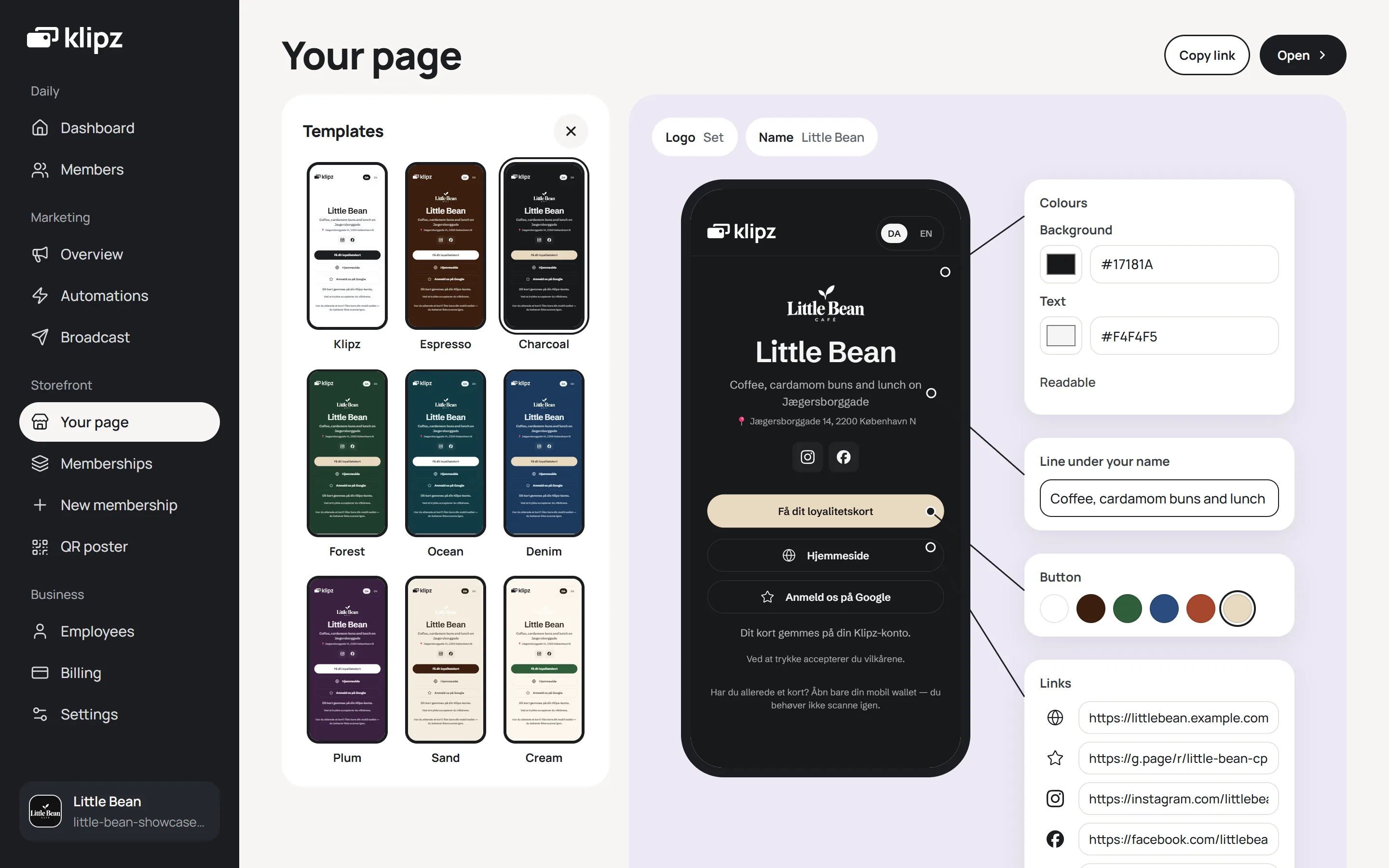
Take one of nine templates, or set the background and text yourself. The preview shows the page as a customer sees it.
Put the QR code out
Print the poster, download the QR code as an image, or order a free acrylic QR stand.
The customer scans
The page opens in the phone's browser. From there the customer joins, writes a review or finds you on Instagram.
What comes with it
Your memberships
The button at the top leads to your memberships. The customer confirms their email once and gets the card in the wallet already on their phone.
Google reviews
Paste the link to your review page, and the customer is one tap from writing a review of your shop.
Socials and website
Instagram, Facebook, TikTok and your website, with your address under your name.
Nine templates
Klipz, Espresso, Charcoal, Forest, Ocean, Denim, Plum, Sand and Cream. Or set the background and text yourself; we tell you if the text gets hard to read.
Danish and English
The customer switches between Danish and English at the top of the page.
Change it any time
New links, new colours, a new line about the shop. The next person to scan sees the change straight away.
In your dashboard
In the dashboard you pick the template, colours and links, and see the page exactly as a customer sees it.
Questions and answers
What does the page cost?
How do I find my Google review link?
Can I give a stamp for a review?
Does the customer need an app?
Can the page have a menu or table booking?

Start your club in five minutes
Create your club, pick what the reward should be, and download the QR stand as a PDF. You don't need to enter card details to get started, and there is no subscription.